
15. OSI and TCP/IP Models: Who cares? Rants and arguments
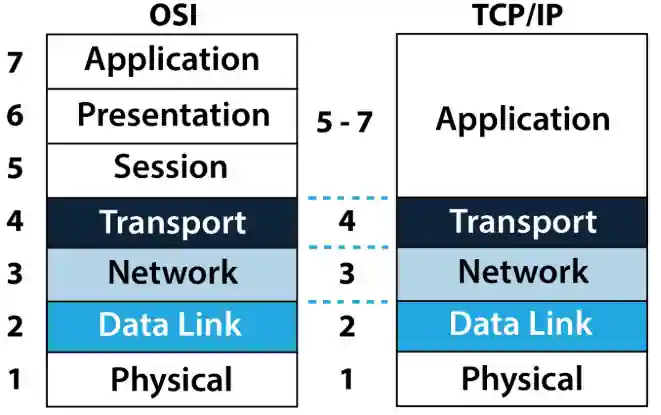
- [[TCP IP Model]] - [[TCP]] (Transmission Control Protocol) / [[IP]] (Internet Protocol)
- Model helps explain meaning of various ambiguous terms. As such, it becomes like an artefact or blueprint, providing clarity and understanding when it comes to explaining the conceptual model to stakeholders.
- [[OSI Model]] vs [[TCP IP Model]] - for CCNA learn [[TCP IP]] and a little of [[OSI]]. As [[OSI Model]] is arguable and debatable because, in the end, it is a conceptual model.
Packet Tracer Lab:
Subnetting Lab 1 (David Bombal)
16. Life is more complicated: Tips and Tricks
David talks about standardisation of cables and various protocols. Thus, nowadays it makes life so much easier.
- [[RJ45]] - [[8P8C]] (8 positions 8 contact) - connector is a modular connector commonly used to terminate twisted pair and multi-conductor flat cable. Consists of a male plug and a female jack, each with 8 equally spaced contacts.
Layer 5 of TCP/IP Model is still called Layer 7 Application because it originally originated from OSI Model.
- Layer 1 - Hubs
- Layer 2 - Bridge/Switch
- Layer 3 - Router
- Layer 4 - Protocols
- Layer 7 - HTTP, HTTPS, FTP, SSH, telnet etc
- [[Request for Comments]] ([[RFC]])
17. Practical TCP/IP Model Part 1: Bits, Frames, Packets, Segments and more
- Layer 1 - Bits
- Layer 2 - Frames
- Layer 3 - Packets
- Layer 4 - Segments
- Layer 7 - Application
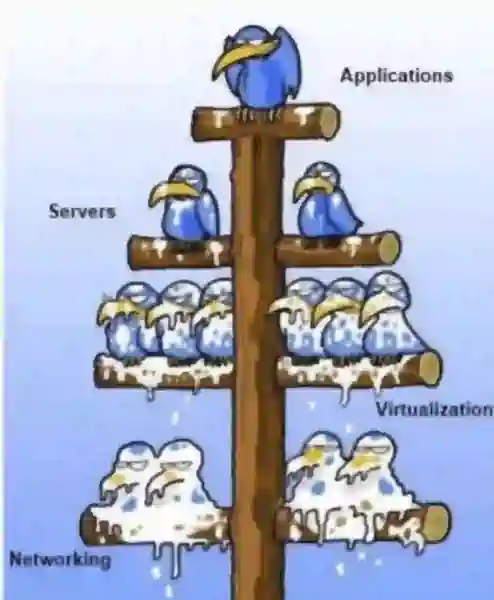
People will always blame the network, even when the problem lies within the Application. Application is Layer 7, and sits at the very top of TCP/IP Model. That is why it is important to know all layers, and know your stuff, to be able to prove that it is not a Network issue, but an application etc.
18. Practical TCP/IP Model Part 2: HTTP captures
Trying to connect to a Server via HTTP e.g. in the browser going to the following link: http://10.1.1.1
- 2 Packets are created:
- [[ARP]] ([[Address Resolution Protocol]])
- On [[Ethernet]] computers communicate on something called [[MAC Address]] (which is a burnt in address onto a [[NIC]]). Thus, in this case because computer doesn’t know MAC Address of the Server, thus it is [[ARP]]ing (or requesting) the MAC Address of the server.
- It sends an ARP request, with a broadcast address to all devices. In this case it sent to a switch, and switch forwarded out of its ports to all other devices. And only the device with the matching IP address gonna reply.
- Now the server, replies back to the switch -> from switch back to the PC. And now PC knows the MAC Address of the server. And can communicate directly to the server.
- Once PC knows [[MAC Address]] of the server. It sends back a [[TCP]] packet (because [[Type Number]] was set for 0x0800 (it knows that at Layer 3 the protocol to be used is IPv4), and [[Protocol Number]] was set to 0x06 (it knows that the at Layer 4 the [[IP version]] to be used is TCP )). And initiate a [[3 way handshake]].
- [[ARP]] ([[Address Resolution Protocol]])
- In [[OSI Model]] / [[TCP IP Model]] How does one Layer refer to the other?
- It uses type field in the [[PDU]]. Where each Layer gonna specify what protocol to be used at the next Layer (higher layer).
- Layer 2 at [[Ethernet]] when device receives the [[Frames]] it uses a [[Type Field]] which indicates which [[Protocol]] to be used at [[Layer 3]] e.g.: [[IPv4]] , [[IPV6]], [[ARP]] etc.
- Layer 3 at IPv4 the [[Protocol Number]] is set to define which [[IP version]] to be used at Layer 4 e.g.: TCP or UDP
19. Practical TCP/IP Model Part 3: Port Numbers
Port numbers allow targeting of specific services or applications within those devices.
Looking at the PDU of a Segment at Layer 4 Transport we can see that destination port is set to 80 (HTTP). The SOURCE port will be set to an [[ephemeral port]] (random number depending on the OS in use). Which means the data is destined to the application which listens on port 80. The server responsible for managing HTTP requests will forward it to HTTP service.
We use port number, to send e.g. [[HTTP]] traffic to HTTP Server or Service, DNS traffic to DNS server, FTP traffic to FTP etc.
- One server usually runs multiple services, and will be able to manage all these requests. And transfer the traffic to the correct service. As long as they listen on that port.
- Server usually listens on a well known port number.
If you send data to the Port 80 (HTTP), HTTP server will accept it and forward it to that application.
On return journey, ports, mac address, and ip addresses get swapped.
[[Ephemeral port]] - short lived ports assigned automatically and at random for a client as a SOURCE PORT.
20. Practical TCP/IP Model Part 4: E-mail and FTP captures
SMTP uses TCP MTP and POP3
Flashcards/Active Recall Q+A: #CCNA/DavidBombal/cards
What is [[TCP IP Model]] / [[OSI Model]] and how is it useful? #card
- OSI Model - it is a set of rules, which governs how computers communicate with each other
- Divided into 7 Layers, which explain how data flows between computers, and how data is packaged, bundled, sent and received.
- It is a conceptual model that helps explain various ambiguous terms, particularly to stakeholders.
- The TCP/IP Model is divided into 5 Layers and more aimed at Network Engineers.
- 1. Physical
- 2. Data Link
- 3. Network
- 4. Transport
- 5. aka Layer 7 Application layer
What are the 7 Layers of the [[OSI Model]]? #card
- 1. Physical - bits - The physical layer sends ones and zeros across a wire or fiber
- 2. Data Link - frames - The data link layer then organizes these ones and zeros into chunks of data and gets them safely to the right place on the wire (by mac address)
- 3. Network - packets - The network layer transmits the organized data over multiple connected networks (e.g. routing based on IP Address)
- 4. Transport - segments - The transport layer delivers the data to the right software application at the destination (TCP - sesgment, UDP - datagram)
- 5. Session - data
- 6. Presentation - data
- 7. Application - data
Which devices are at which TCP/IP Model? #card
- Layer 1 - Hubs
- Layer 2 - Bridge/Switch
- Layer 3 - Router
- Layer 4 - Protocols
- Layer 7 - HTTP, HTTPS, FTP, SSH, telnet etc
Why do we still call TCP/IP Models Layer 5 as Layer 7 Application? #card
- Due to its relevance to the conceptual model.
What is [[RFC]]? #card
- Request for Comments - this is a standard that everyone has agreed to use.
What [[protocol data unit]]s ([[PDU]]s) are being sent at which [[OSI Model]] / [[TCP IP Model]] Layer? #card
- Layer 1 - bits
- Layer 2 - Frames
- Layer 3 - Packets
- Layer 4 - Segments
- Layer 7 - Data
Why it is network engineers who are usually are being blamed for all the problems? #card
- One of the reasons is because most of the networking stuff resides at lower layers of [[OSI Model]] / [[TCP IP Model]]
What is [[PDU]] - Protocol Data Unit? #card
- Short answer: bit, frame, packet, segment, data
- It is a generic term for the small piece of information at each layer in the [[OSI model]] / [[TCP IP Model]] .
- At each Layer it uses different PDU.
- Layer 1 Physical - bits - The physical layer sends ones and zeros across a wire or fiber
- Layer 2 Data Link - Frames - The data link layer then organizes these ones and zeros into chunks of data and gets them safely to the right place on the wire (by *mac address*).
- Layer 3 Network - Packets - The network layer transmits the organized data over multiple connected networks (e.g. routing based on *IP Address*) - The transport layer delivers the data to the right software application at the destination (TCP - segment, UDP - datagram)
- Layer 4 Transport - Segments
- Layer 7 Application - Data
What is [[ARP]]? #card
In [[OSI Model]] / [[TCP IP Model]] How does one Layer refer to the other? #card
- It uses [[type field]] / [[EtherType]] or [[protocol number]] within the [[PDU]]. Where each layer gonna specify what protocol to use at the next Layer (higher layer).
- As such, it specifies which Layer will be next.
- Layer 2 - a [[Type Field]] / [[EtherType]] defines what payload is contained within [[Ethernet Frame]], and indicates which [[protocol]] to be used at [[Layer 3]] e.g.: [[IPv4]] , [[IPV6]], [[ARP]] etc.
- 0x0800 - IPv4
- x86DD - IPv6
- x0806 - ARP
- - Layer 3 - the [[protocol number]] is set to define which [[IP version]] to be used at Layer 4 e.g.: TCP or UDP
- `0x06` - for TCP
- `x11` - for UDP
- - Layer 4 - the [[Port Number]] is used to differentiate multiple applications which are used at [[Layer 7]]
- `Port 20` & `Port 21` - [[FTP]]
- `Port 22` - [[SSH]]
- `Port 23` - [[Telnet]]
- `Port 25` - [[SMTP]]
- `Port 53` - [[DNS]]
- `Port 80` - [[HTTP]]
- `Port 110` - [[POP3]]
- `Port 123` - [[NTP]]
- `Port 143` - [[IMAP]]
- `Port 179` - [[BGP]]
- `Port 443` - [[HTTPS]]
- `Port 3389` - [[RDP]]
w
What is [[Type Field]], [[EtherType]] and [[protocol number]]? And why it is important? #card
- Type Field is a field within Ethernet Frames (Layer 2 Data Link) PDU which specifies various EtherType numbers in hexadecimal. And which specifies which protocol would need to be used at the higher Layer. The most common **ethertypes** are:
- `0x0800` - IPv4
- `0x86DD` - IPv6
- `0x0806` - ARP
- Protocol Number - is set at Network Layer 3 to define which [[IP version]] to be used at Layer 4 e.g.: TCP or UDP
- `0x06` - for TCP
- `0x11` - for UDP
What is a [[port number]]? #card
- Ports are a Transport Layer 4 concept
- Ports allow computers to differentiate between different kinds of traffic. They allow to target specific service or application. e.g. send HTTP traffic to HTTP server, DNS to DNS, FTP to FTP etc.
- Port are standardised and assigned with specific numbers. There are over 65000 possible port numbers, with different ranges for different operating systems.
- Port numbers are always associated with IP address of a host.
- Port numbers primarily use transport layer protocols: [[TCP]] or [[UDP]]
- Most common services are always listening on specific ports.
What are some of the most common [[port number]] ? #card
- `Port 20` & `Port 21` - [[FTP]]
- `Port 22` - [[SSH]]
- `Port 23` - [[Telnet]]
- `Port 25` - [[SMTP]]
- `Port 53` - [[DNS]]
- `Port 80` - [[HTTP]]
- `Port 110` - [[POP3]]
- `Port 123` - [[NTP]]
- `Port 143` - [[IMAP]]
- `Port 179` - [[BGP]]
- `Port 443` - [[HTTPS]]
- `Port 3389` - [[RDP]]
What is an [[ephemeral port]]? #card
- Ephemeral port is a short lived port number assigned automatically and at random (depending on OS in use) as a SOURCE PORT of a client.
One Page Summary
[[OSI Model]] Overview 1
| Layer | Devices / Protocol | Column 1 | Column |
|---|---|---|---|
| 7. [[Application Layer]] | —————— | [[DHCP]], [[DNS]], [[FTP]], [[HTTP]], [[IMAP4]], [[NNTP]], [[POP3]], [[SMTP]], SNMP, SSH, TELNET and NTPmore) | |
| 6. [[Presentation layer]] | —————— | ——– | [[SSL]], [[WEP]], [[WPA]], [[Kerberos]] |
| 5. [[Session layer ]] | Logical Ports 21, 22, 23, 80 etc… | ||
| 4. [[Transport Layer ]] | [[TCP]]/[[UDP]] | [[Segments]] | [[TCP]], [[SPX]] and [[UDP]] more) |
| 3. [[Network Layer]] | Multilayer [[Switch]] & [[Router]]s | [[Packets]] | [[IPv4]], [[IPV6]], [[IPX]], [[OSPF]], [[ICMP]], [[IGMP]] and [[ARPMP ]] |
| 2. [[Data Link Layer ]] | Switches/Bridges/Wireless Access Point | [[Frames]] | [[802.11]] ([[WLAN]]), [[Wi-Fi]], [[WiMAX]], [[ATM]], [[Ethernet]], Token Ring, [[Frame Relay]], [[PPTP]], [[L2TP]] and ISDN-ore) |
| 1. [[Physical Layer]] | Hubs/Repeaters | Bits | Hubs, Repeaters, Cables, Optical Fiber, SONET/SDN, [[Coaxial Cable]], [[Twisted Pair Cable]] and Connectors (more) |
[[OSI Model]] Overview 2
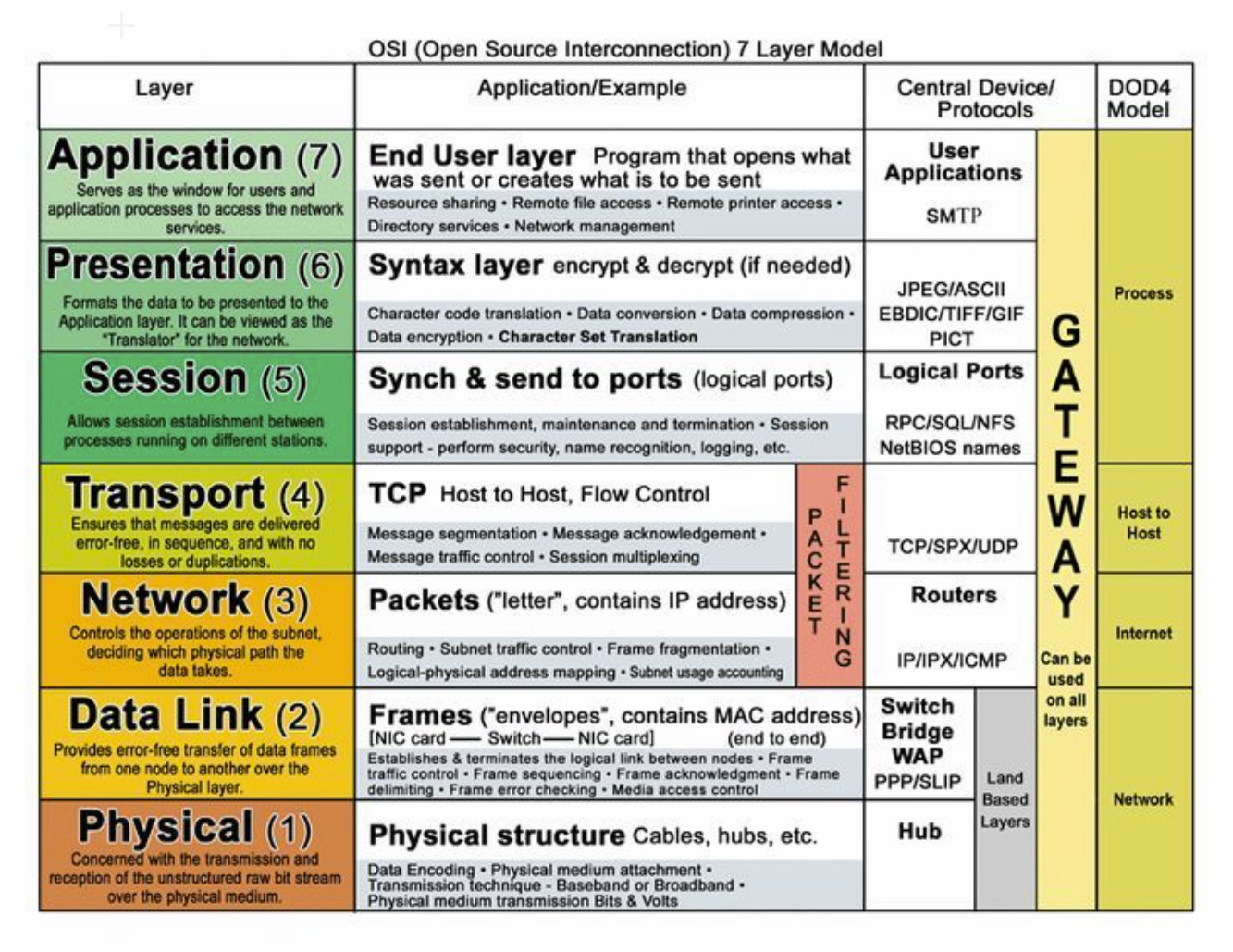
How Layers connect
- [[Layer 2]] - [[Data Link Layer]] → has [[Type Number]] to specify what [[Layer 3 protocol]] to use… e.g. [[NIC]] needs to know to what [[Layer 3 Protocol]] to send traffic to and the type number needs to be used.
- [[Layer 3]] - [[Network Layer]] → [[Protocol Number]] is used to specify what [[IP version]] to use in Upper [[Layer 4]]. E.g. [[TCP]] or [[UDP]]
- [[Layer 4]] - [[Transport Layer]] → [[Port Number]] is used to differentiate multiple applications which are used at [[Layer 7]]