60 IPv4 Subnetting Cheat Sheet
PacketLife.net IPv4 Subnetting Cheat Sheet
61. CCNA VLOG #050: CCNA IP addressing and subnetting: Are these hosts on the same subnet? (8:50)
It all depends on the subnet.
62. CCNA VLOG #051: CCNA IP addressing and subnetting: Can these hosts ping each other? (7:32)
10.1.255.1/17 can it ping → 10.1.128.2/17
/17 = 255.255.128.0
It has different HOST portion, but it has same NETWORK portion - thus they still can ping each other.
63. CCNA VLOG #053: CCNA IP addressing and subnetting: Can these hosts ping each other? (6:51)
10.1.248.1/20 can it ping? → 10.1.192.2/20
/20 = 11111111.11111111.1111 0000. 00000000 = 255.255.240.0
NOPE, because subnets differ:
10.1.248.1 = 10.1.1111 1000.1
10.1.192.2 = 10.1.1100 0000.2
, but if we change the mask to
/18 = 255.255.1100 0000.0 = 255.255.190.0
Thus, 10.1.248.1/18 can ping 10.1.192.2/18
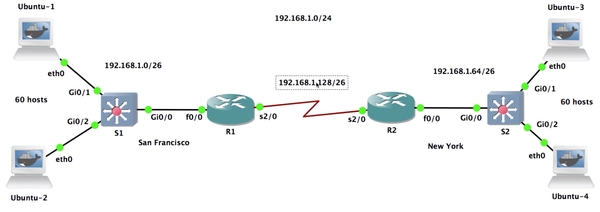
64 - 67 CCNA VLOG #079: IP Addressing and IP Subnetting for the CCNA Exam (Part 1). Practical IP Subnetting. (10:58)
Sub: 192.168.1.0/24
Hosts: 60 per network
/24 = 255.255.255.0
-
To divide Subnet, to support 60 hosts per network we use $2^n-2$
$\Large{2^6-2=62}$
6 bits towards hosts = 192.168.1.0000 0000 = /24 + 2 = /26
The new IP is: 192.168.1.0/26 or 255.255.255.192
-
Try various combinations to workout Subnets. 192.168.0.00 00 0000 = 192.168.0.0/26
192.168.0.01 00 0000 = 192.168.0.64/26
192.168.0.10 00 0000 = 192.168.0.128/26
192.168.0.11 00 0000 = 192.168.0.192/26 -
The answer:
192.168.0.0/26 - San Francisco
192.168.0.64/26 - New York
192.168.0.128/26 - For Serial Link