
47. IP Subnetting Part 1
David suggests 2 methods to subnetting:
a) binary method
b) quick method
- When we get IP address we should be able to workout:
- Subnet Address
- 1st Host Address
- Last Host Address
- Broadcast Address
192.168.10.18/24
- What IP address would router1 be configured with if it is to use the first IP Address in the same subnet as PC1?
192.168.10.1/24 - What broadcast address is used by PC1?
192.168.10.255/24 - What IP address would Router1 be configured with if it is to use the last IP address in the same subnet as PC1?
- What subnet is PC1 is part of?
Binary Method #CCNA/DavidBombal/subnetting
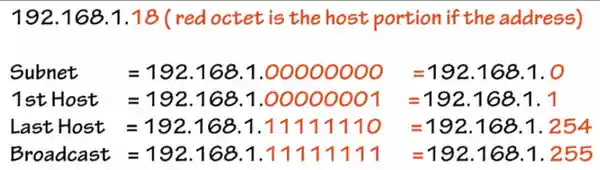
Network/Subnet Address - Fill the host portion of an address with binary 0s
192.168.1.00000000 = 192.168.1.0
First Host - fill the host portion of an address with binary 0s except for the last bit which is set to binary 1
192.168.1.00000001 = 192.168.1.1
Last host - fill the host portion of an address with binary 1s except for the last bit which is set to binary 0
192.168.1.11111110 = 192.168.1.254
Broadcast Address - fill the host portion of an address with binary 1s
192.168.1.11111111 = 192.168.1.255
Example 1
192.168.1.18/24
Example 2
172.16.35.123/20
- Convert IP address, especially in this case 3rd and 4th octet
172.16.35.123=172.16.00100011.01111011 - Workout the subnet mask by writing /20 as contiguous 1s
11111111.11111111.11110000.00000000 or 255.255.240.0 - Now if you combine this bit range with previously converted IP address:
172.16.00100011.01111011 - Now we can workout first, last, broadcast ranges from this cutoff range.
172.16.00100011.01111011
172.16.00100000.00000000 = 172.16.32.0 - subnet
172.16.00100000.00000001 = 172.16.32.1 - 1st
172.16.00101111.11111110 = 172.16.47.254 - last
172.16.00101111.111111101 = 172.16.47.255 - broadcast
48. IP Subnetting Part 2
Example 3
172.16.129.1/17
/17 means that 17bits of a 32bit IP address are used for the network/subnet and the remaining 15 are for the hosts
172.16.10000001.00000001 = 172.16.129.1
172.16.10000000.00000000 = 172.16.128.0 - subnet
172.16.10000000.00000001 = 172.16.128.1 - 1st
172.16.11111111.11111110 - 172.16.255.254 - last
172.16.11111111.111111111 - 172.16.255.255 - broadcast
Quick Method #CCNA/DavidBombal/subnetting
- FInd out where the subnet mask is not 255
e.g.:172.16.35.123/20-> 3rd octet is not equal 255 - Convert /20 into traditional mask of 255.255.11110000.00000000 -> 255.255.240.0
- Use the number from 3rd octet and subtract it from 256.
256-240=16 - Now multiple this number 16 as many times until you get as close as possible to the original 172.16.35
- 16+16=32 -> much closer to the original number
16+16+16=48 -> too high - Thus the network range starts at
172.16.32.0/20
50. IP Subnetting Part 3
- To workout broadcast address = Next network -1
172.16.48.0 -1 =172.16.47.255/20 - To workout first host in the subnet = Subnet +1
172.16.48.0 +1 = `172.16.32.1/20 - To workout last host = Broadcast-1
172.16.47.255 -1 =172.16.47.254/20
How to Subdivide a network/subnet when given a specific number of hosts/subnets? #CCNA/DavidBombal/subnetting
e.g. 192.168.1.0/24
$2n-2$
n - is the number of binary bits
50. IP Subnetting Part 4
Best way to subdivide the network is to use the binary method.
To workout the number of hosts per subnet use the below formula:
$2^n-2=Number Of Hosts$
-1 - is deducted for the broadcast address
-1 - and another is deducted for the subnet
To workout the number of networks:
2^n=Networks
Example 1 #CCNA/DavidBombal/subnetting/numberhosts
10.1.1.0/24 - split into subnets supporting 14 machines
- Workout the formula e.g.: $2^n-2$
- Because we need 14 machines $2^4=16$
- 16 is the closest number. Then minus 2: 16-2=14
- Now we know that we need 4 bits from the host portion and allocate that to the network portion
- 10.1.1.0000 0000
- 8+8+8+4=28bits
- Now to workout subnets:
10.1.1.0000 0000=10.1.1.0/28 - 1st subnet
10.1.1.0001 0000=10.1.1.16/28 - 2nd subnet
10.1.1.0010 0000=10.1.1.32/28 - 3rd subnet
…
10.1.1.1111 0000=10.1.1.240/28 - Last network - Number of subnets available is $2^4=16$.
The answer is 16.
And the number of hosts each subnet supports $2^4-2=14$.
51. IP Subnetting Part 5
Example 2 #CCNA/DavidBombal/subnetting/numberofnetworks
10.128.192.0/18 - needs 30 subnets with as many hosts as possible
- $2^5=32$ (2 subnets too many, but that’s ok)
- 10.128.11000000.0
- We have to steal 5bits from the host portion to create the subnet 10.128.11000000.0
- Now we can workout the new subnet mask.
8+8+7+0=23
10.128.192.0/23 - Workout the subnets by adding 1s into the binary
10.128.11000000.0 = 10.128.192.0/23
10.128.11000010.0 = 10.128.194.0/23
10.128.11000100.0 = 10.128.196.0/23
10.128.11000110.0 = 10.128.198.0/23
…
10.128.11111110.0 = 10.128.254.0/23
Flashcards/Active Recall Q+A
What is the binary method of subnetting? #card
- Binary method involves converting decimal IP address into binary. And in particular that octet which doesn't fit into a standard 255 mask.
- Network/Subnet Address
- Fill the host portion of an address with binary 0s
- 192.168.1.00000000 = 192.168.1.0
- First Host
- Fill the host portion of an address with binary 0s except for the last bit which is set to binary 1
- 192.168.1.00000001 = 192.168.1.1
- Last host
- Fill the host portion of an address with binary 1s except for the last bit which is set to binary 0
- 192.168.1.11111110 = 192.168.1.254
- Broadcast Address
- Fill the host portion of an address with binary 1s
- 192.168.1.11111111 = 192.168.1.255
- E.g.:
172.16.35.123/20
- Convert IP address, especially in this case 3rd and 4th octet 172.16.35.123=172.16.00100011.01111011
- Workout the subnet mask by writing /20 as contiguous 1s 11111111.11111111.11110000.00000000 or 255.255.240.0
- Now if you combine this bit range with previously converted IP address: 172.16.00100011.01111011
- Now we can workout first, last, broadcast ranges from this cutoff range. 172.16.00100011.01111011
172.16.00100000.00000000 = 172.16.32.0 - subnet
172.16.00100000.00000001 = 172.16.32.1 - 1st
172.16.00101111.11111110 = 172.16.47.254 - last
172.16.00101111.111111101 = 172.16.47.255 - broadcast
How to workout Network Address given the IP address of 192.168.1.18/24? #card
- Mask is 24bit. Which means each octet has full 8bits. Thus, the answer is
192.168.1.0/24
How to workout First Host Address given the IP address of 192.168.1.18/24? #card
- Mask is 24bit. Which means each octet has full 8bits. Thus, we have to enable onl the last bit. The answer is
192.168.1.00000001=192.168.1.1
How to workout Last Host Address given the IP address of 192.168.1.18/24? #card
- Mask is 24bit. Which means each octet has full 8bits. Thus, we have to disable only the last bit, and the answer is:
192.168.1.11111110=192.168.1.254
How to workout Broadcast Address given the IP address of 192.168.1.18/24? #card
- Mask is 24bit. Which means each octet has full 8bits. Thus, we has to set all bits as 1s, and the answer is
192.168.1.11111111=192.168.1.1
How to workout Network/Subnet Address given the IP address of 192.168.35.123/20? #card
- Convert IP address, especially in this case 3rd and 4th octet 172.16.35.123=172.16.00100011.01111011
- Workout the subnet mask by writing /20 as contiguous 1s 11111111.11111111.11110000.00000000 or 255.255.240.0
- Now if you combine this bit range with previously converted IP address: 172.16.00100011.01111011
- Now we can workout subnet address by seting all 1s into 0s after the network mask. 172.16.00100011.01111011
172.16.00100000.00000000 = 172.16.32.0 - subnet
How to workout First, Last & Broadcast Address given the IP address of 192.168.35.123/20? #card
- Convert IP address, especially in this case 3rd and 4th octet 172.16.35.123=172.16.00100011.01111011
- Workout the subnet mask by writing /20 as contiguous 1s 11111111.11111111.11110000.00000000 or 255.255.240.0
- Now if you combine this bit range with previously converted IP address: 172.16.00100011.01111011
- Now we can workout 1st IP address by seting last 0 into 1: 172.16.00100011.01111011
172.16.00100000.00000000 = 172.16.32.0 - subnet
172.16.00100000.00000001 = 172.16.32.1 - 1st
172.16.00101111.11111110 = 172.16.47.254 - last
172.16.00101111.111111101 = 172.16.47.255 - broadcast
What is the quick method of subnetting? #card
- Getting traditional decimal mask and divinding it from 256. Then multiplying the number that you get until you get as close as possible to the original. That is your 1st subnet. Broadcast address = Next network -1. first host in the subnet = Subnet +1. last host = Broadcast-1
- FInd out where the subnet mask is not 255 e.g.:
- Convert /20 into traditional mask of 255.255.11110000.00000000 -> 255.255.240.0
- Use the number from 3rd octet and subtract it from 256. 256-240=16
- Now multiple this number 16 as many times until you get as close as possible to the original 172.16.35
- 16+16=32 -> much closer to the original number 16+16+16=48 -> too high
- Thus the network range starts at
172.16.32.0/20 - To workout broadcast address = Next network -1 172.16.48.0 -1 =
- To workout first host in the subnet = Subnet +1 172.16.48.0 +1 =
- To workout last host = Broadcast-1 172.16.47.255 -1 =
172.16.35.123/20 -> 3rd octet is not equal 255172.16.47.255/20172.16.32.1/20172.16.47.254/20How to Subdivide a network/subnet when given a specific number of hosts/subnets? #card
- Best way to subdivide the network is to use the binary method
- To workout the number of hosts per subnet use the below formula:
-1- is deducted for the broadcast address-1- and another is deducted for the subnet- To workout the number of networks:
2^n-2=Number Of Hosts
2^n=Networks
What is the formula to use when you know how many hosts you want to fit into the network/subnet? #card
2^n-2=NumberOfhost
What is the formula to workout the number of networks? #card
2^n=Numberofnetworks
How to split the below address 10.1.1.0/24 to support 14 machines per subnet? #card
- Workout the formula e.g.:
2^n-2
- Because we need 14 machines $2^4=16$
- 16 is the closest number. Then minus 2: 16-2=14
- Now we know that we need 4 bits from the host portion and allocate that to the network portion
- 10.1.1.0000 0000
- 8+8+8+4=28bits
- Now to workout subnets: 10.1.1.0000 0000=10.1.1.0/28 - 1st subnet
- Number of subnets available is
2^4=16
.
The answer is 16.
10.1.1.0001 0000=10.1.1.16/28 - 2nd subnet
10.1.1.0010 0000=10.1.1.32/28 - 3rd subnet
...
10.1.1.1111 0000=10.1.1.240/28 - Last network
And the number of hosts each subnet supports
2^4-2=14
Split below address 10.128.192.0/18 into 30 subnets with each supporting as many hosts as possible #card
- $2^5=32$ (2 subnets too many, but that's ok)
- 10.128.11000000.0
- We have to steal 5bits from the host portion to create the subnet 10.128.11000000.0
- Now we can workout the new subnet mask. 8+8+7+0=23
- Workout the subnets by adding 1s into the binary 10.128.11000000.0 = 10.128.192.0/23
10.128.192.0/23
10.128.11000010.0 = 10.128.194.0/23
10.128.11000100.0 = 10.128.196.0/23
10.128.11000110.0 = 10.128.198.0/23
...
10.128.11111110.0 = 10.128.254.0/23